 AppCub
Make an appointment app for your clinic
Your doctors, their timings, appointment requests and a call button, in one Android app with your clinic’s name on it. Describe it in a chat and AppCub builds it. No coding needed.
Describe your app and see the plan for free. Build it with a 2-day trial for ₹99.
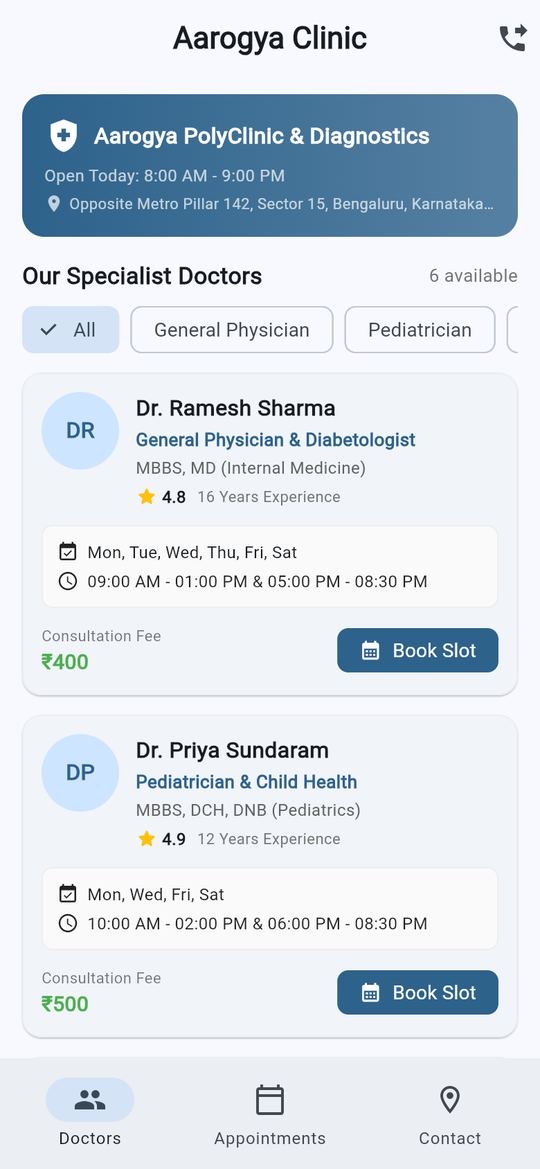
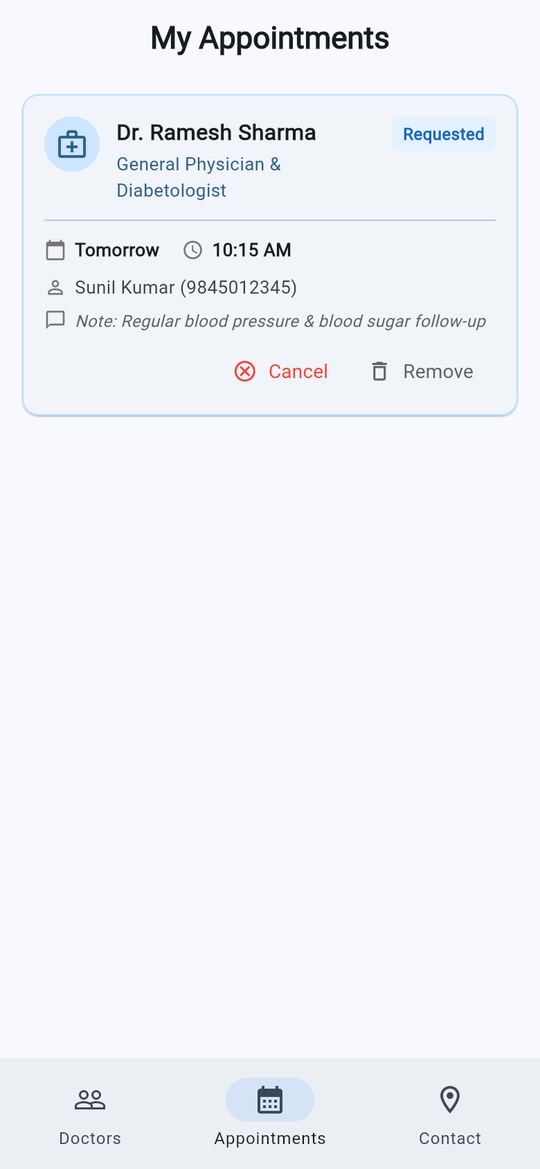
These are screens of a real app AppCub built in a test on 3 October 2026 from one sentence. AppCub made up the doctors, ratings and fees as examples; yours replace them.
What your app can do
Clinic apps usually start with these. Ask for what your clinic needs:
Doctors and timings
Each doctor with speciality, qualifications, days, hours and consultation fee.
Appointment requests
Patients choose a doctor, a date and a time and send a request.
Requests sent to you
Ask for each request to arrive on your clinic’s WhatsApp, so the reception can confirm it.
Contact and directions
Address, opening hours, a call button and a map link.
Your clinic’s name
Your name, logo and colours. Attach a picture of a design you like and AppCub follows it.
More when you need it
Health packages, lab test prices, a token number, holiday notices. Ask in the chat.
What to write
Copy this, change the details to match your clinic, and paste it into AppCub:
Make an app for my clinic, Aarogya Clinic in Bengaluru. Show our doctors with speciality, days, timings and fee: Dr. Sharma, general physician, Mon–Sat 9–1 and 5–8, ₹400; Dr. Sundaram, child specialist, Mon/Wed/Fri 10–2, ₹500. Patients pick a doctor, date and time, enter name and phone, and the request is sent to our WhatsApp at 98XXXXXXXX to confirm. Show the address with a call button and a map link. Blue and white colours.
Paste and send
AppCub asks if something important is unclear.
Approve the plan
Check the screens and features. Change them for free until they are right.
Try it
The app runs live next to the chat. Scan a QR code to install it on your phone.
Ask for changes
Say what to change, or click the part of the app you want changed.
What it costs
- A clinic app like the one above usually takes 60 to 110 credits to build. Describing it and seeing AppCub’s plan is free; building it starts with a 2-day trial for ₹99 (150 credits, enough for the app and a few changes).
- To publish on Google Play you need a paid plan, which includes the Play Store bundle and your app’s signing key. Starter is ₹1,599 a month for 700 credits.
- Work that fails or is rolled back costs nothing, and every change comes with one free fix.
Good to know
- A simple app keeps requests on the patient’s phone. For requests to reach you, ask for them to be sent on WhatsApp, or connect a Supabase database (it has a free plan) to see all of them in one place.
- Keep medical records and reports out of a simple app. If your app stores patients’ details online, your clinic is responsible for protecting them under India’s data protection law; ask AppCub for sign-in so each patient sees only their own details.
- AppCub builds Android apps and can put your app online as a web link that opens on any phone. For the iPhone App Store, our team can do it for you.
Questions
Will my reception know about each appointment?
Yes, if you ask for it. The simplest way is that each request opens WhatsApp with the details filled in, addressed to your clinic’s number. For a list of all appointments in your own app, connect a Supabase database from the chat.
Can patients see free and booked slots?
Only if the app has an online database, so it knows about everyone’s bookings. Ask AppCub to block slots that are taken once you connect one.
Can patients pay the consultation fee in advance?
You can ask for a payment button that uses your own Razorpay account. Connect Razorpay and a Supabase database from the Connectors page first.
Can I put the app on Google Play?
Yes, from your own Google Play developer account (a one-time US$25 fee to Google). Google asks health apps for extra declarations; our team can do the Google Play steps for you.
Can I write to AppCub in Hindi or Hinglish?
Yes. Write the way you normally do, in English, Hindi or Hinglish. You can also ask for the app’s own buttons and labels in Hindi.
What if I want to change something later?
Open the app in AppCub and say what should change, or click the part of the app you want changed. You can always go back to an earlier version.
Apps for other businesses
Start with your own clinic
See the plan for free, then build it with a 2-day trial for ₹99.
Build your clinic app