 AppCub
Make an app for your housing society
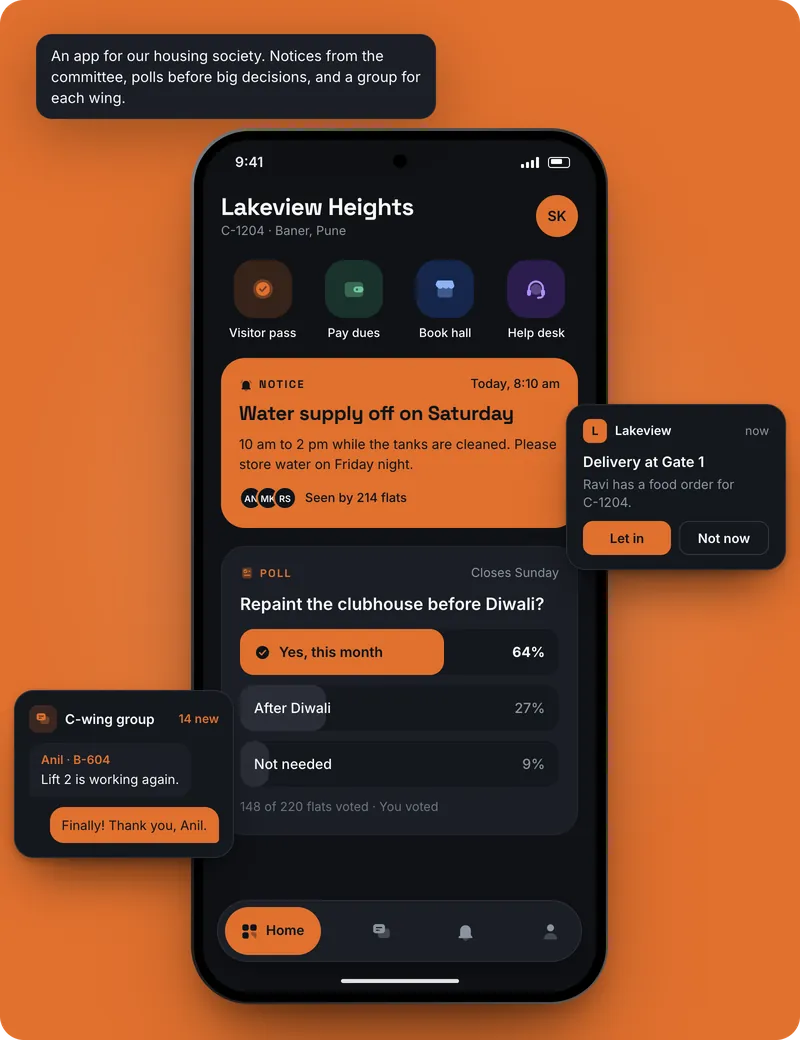
Notices from the committee, polls before big decisions, maintenance dues and complaints, in one app for every flat, with your society’s name on it. Describe it in a chat and AppCub builds it.
AppCub opens on 18 October 2026. Join the waitlist and we’ll message you on WhatsApp that day.
Describe your app and see the plan for free. Build it with a 2-day trial for ₹99.
What your app can do
Society apps usually start with these. Ask for what your society needs:
Notices
Water cuts, meetings and festivals from the committee, with the newest on top.
Polls
One question, a few options, one vote per flat, and the result for everyone to see.
Maintenance dues
Each flat’s monthly maintenance, what is paid and what is pending, with a WhatsApp reminder.
Complaints
Residents report a leak or a broken light with a photo, and the committee marks it done.
Wings and flats
Residents by wing and flat number, so notices can go to one wing.
More when you need it
Clubhouse booking, a visitor list, staff contacts, documents like the bye-laws. Ask in the chat.
What to write
Copy this, change the details to match your society, and paste it into AppCub:
Make an app for our housing society, Green Valley Apartments in Pune, with wings A to D. Residents sign in with their flat number and phone. The committee posts notices for everyone or one wing, and creates polls with one vote per flat. Show each flat’s monthly maintenance of ₹2,500 as paid or pending, with a WhatsApp reminder. Residents raise complaints with a photo and see their status. Green colours.
Paste and send
AppCub asks if something important is unclear.
Approve the plan
Check the screens and features. Change them for free until they are right.
Try it
The app runs live next to the chat. Scan a QR code to install it on your phone.
Ask for changes
Say what to change, or click the part of the app you want changed.
What it costs
- A society app like the one above usually takes 60 to 110 credits to build. Describing it and seeing AppCub’s plan is free; building it starts with a 2-day trial for ₹99 (150 credits, enough for the app and a few changes).
- To publish on Google Play you need a paid plan, which includes the Play Store bundle and your app’s signing key. Starter is ₹1,599 a month for 700 credits.
- Work that fails or is rolled back costs nothing, and every change comes with one free fix.
Good to know
- Every flat sees the same notices and polls only when the app has an online database, so connect a Supabase database (it has a free plan) from the chat. AppCub sets up sign-in for residents and the committee.
- Keep residents’ details visible only to the committee unless they agree otherwise. Your society is responsible for protecting them.
- AppCub builds Android apps and can put your app online as a web link that opens on any phone. For the iPhone App Store, our team can do it for you.
Questions
Can residents pay maintenance in the app?
You can ask for a payment button that uses the society’s own Razorpay account. Connect Razorpay and Supabase from the Connectors page first.
Can the security guard use it for visitors?
Ask for a visitor list with a guard login: the guard adds a visitor and the flat sees it. Tell AppCub how your gate works.
How is this different from a WhatsApp group?
Notices don’t get lost under chat messages, polls count one vote per flat, and dues and complaints have a status. Many societies keep the WhatsApp group for chatting.
Who owns the data?
Your society does. It sits in your own Supabase project, and the app and its code are yours.
Can I write to AppCub in Hindi or Hinglish?
Yes. Write the way you normally do, in English, Hindi or Hinglish. You can also ask for the app’s own buttons and labels in Hindi.
What if I want to change something later?
Open the app in AppCub and say what should change, or click the part of the app you want changed. You can always go back to an earlier version.
Start with your own society
Describe your app and see the plan for free. Build it with a 2-day trial for ₹99.