 AppCub
Make an app for your tiffin service
Today’s menu, orders sent on your WhatsApp and monthly customers with their dues, in one Android app with your kitchen’s name on it. Describe it in a chat and AppCub builds it. No coding needed.
This app is ready-made: it runs in about 5 minutes, free, with your own name on it. Changing it in chat starts with a 2-day trial for ₹99.
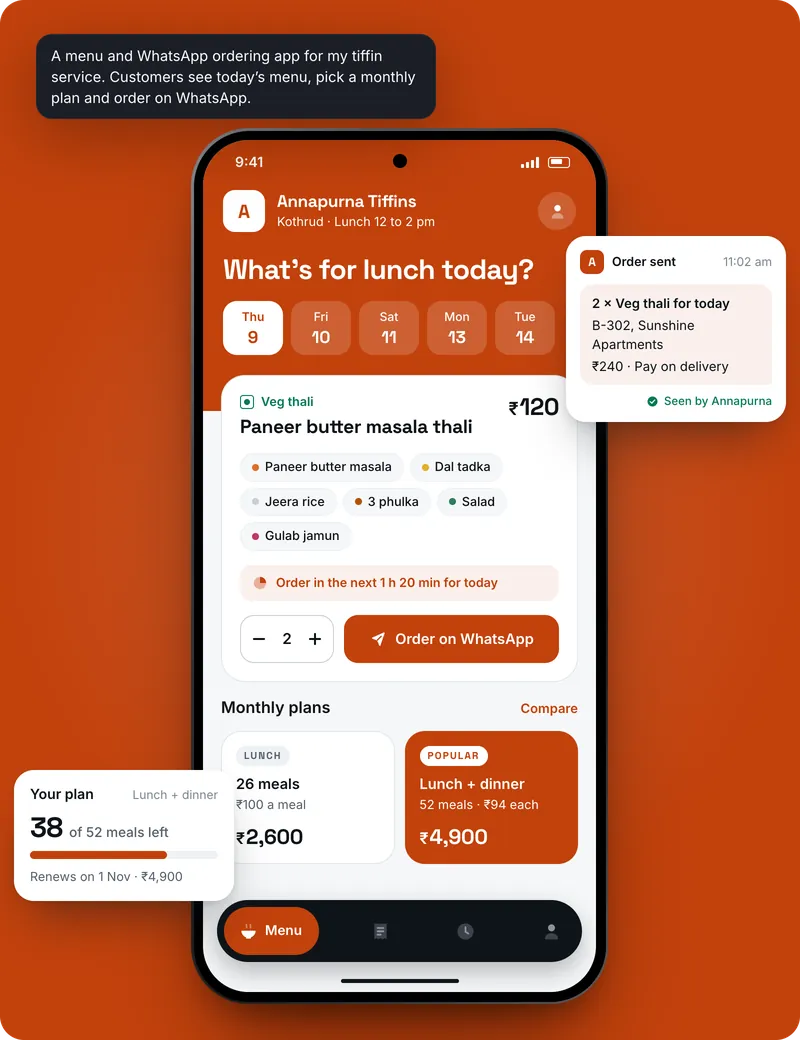
What your app can do
The ready-made tiffin app starts with these. Ask for what your kitchen needs:
Today’s menu
Add dishes with prices, veg or non-veg, for lunch, dinner or both, and mark a dish sold out.
Orders by slot
Take an order with the customer’s address, lunch or dinner and the dishes, and see the total.
Orders on WhatsApp
Tap “Send on WhatsApp” and WhatsApp opens with the order summary and total.
Cook summary
Today’s orders by lunch and dinner, and how many of each dish to make.
Monthly customers
Each one’s plan, monthly amount, and paid or due this month, with a WhatsApp reminder for dues.
More when you need it
A screen your customers order from, with a cart and past orders, a weekly menu, delivery areas. Ask in the chat.
What to write
For a screen your customers order from, copy this, change the details to match your kitchen, and paste it into AppCub:
Make an app for my tiffin service, Aunty’s Ghar Ka Tiffin in Pune. Show today’s menu: standard thali ₹110, paneer thali ₹160, extra roti ₹10, all pure veg. Customers add items to a cart, choose lunch or dinner, enter name, phone and address, and send the order to me on WhatsApp at 98XXXXXXXX. Lunch orders close at 11 AM. Keep their past orders so they can reorder. Orange colours.
Paste and send
AppCub asks if something important is unclear.
Approve the plan
Check the screens and features. Change them for free until they are right.
Try it
The app runs live next to the chat. Scan a QR code to install it on your phone.
Ask for changes
Say what to change, or click the part of the app you want changed.
What it costs
- A tiffin app like the one above usually takes 60 to 110 credits to build. Describing it and seeing AppCub’s plan is free; building it starts with a 2-day trial for ₹99 (150 credits, usually enough for the app).
- To publish on Google Play you need a paid plan, which includes the Play Store bundle and your app’s signing key. Starter is ₹1,599 a month for 700 credits.
- Work that fails or is rolled back costs nothing, and every change comes with one free fix.
Good to know
- The ready-made app keeps your menu, orders and customers on your phone, with no database. If you add a screen your customers order from, their orders still reach you on WhatsApp; to show the menu you change each day on their phones, connect a Supabase database (it has a free plan).
- AppCub builds Android apps and can put your app online as a web link that opens on any phone. For the iPhone App Store, our team can do it for you.
- To put the app on Google Play you need your own Google Play developer account, which costs a one-time US$25 fee to Google.
Questions
How do I change the menu every day?
In the app’s Menu tab: add dishes and mark them sold out. If you add a screen your customers order from, connect a Supabase database from the chat so the menu reaches their phones too.
Can I keep monthly tiffin customers?
Yes. The Customers tab keeps each one’s plan, monthly amount and whether they have paid this month, with a WhatsApp reminder for dues. To count meals, for example 26 lunches a month, ask in the chat.
Can customers pay online?
You can ask for a payment button that uses your own Razorpay account. Connect Razorpay and a Supabase database from the Connectors page first. Many tiffin services start with UPI or cash on delivery.
Can I share the app on WhatsApp before it’s on Google Play?
Yes. Put the app online as a web link and share the link, or share the installable APK file.
Can I write to AppCub in Hindi or Hinglish?
Yes. Write the way you normally do, in English, Hindi or Hinglish. You can also ask for the app’s own buttons and labels in Hindi.
What if I want to change something later?
Open the app in AppCub and say what should change, or click the part of the app you want changed. You can always go back to an earlier version.
Want a website too?
AppCub also makes websites: real pages Google can read, with your services, prices and timings, and WhatsApp and call buttons. Make a tiffin service website
Start with your own kitchen
This app is ready-made: it runs in about 5 minutes, free, with your own name on it. Changing it in chat starts with a 2-day trial for ₹99.