 AppCub
How to make an app for a beauty parlour
A parlour's day is a mix of quick walk-ins for threading and longer appointments for facials and party makeup, plus home visits. An app on the counter phone keeps who is booked, what each client had last time and how much she owes or has pre-paid.
Updated 2026-11-09
Who uses the app
Usually the owner, on the counter phone, so the data can stay on that phone. If a beautician going for home visits should see her bookings on her own phone, connect your own Supabase database so both phones show the same list.
The screens a beauty parlour app needs
- Today: Walk-ins and appointments in order, with the service, the beautician and home visits marked
- Clients: Search by name or phone; past services, notes like 'sensitive skin, patch test before bleach' and last visit date
- Rate list: Every service with its price and time taken, grouped as threading, waxing, facials, hair and makeup
- Package cards: Monthly or festive packages, such as 4 threading and 1 facial, with visits used and left
- Home visits: Address, Google Maps link, time and the extra charge for each home booking
- Bills: The day's bills by cash or UPI, and a bill as a PDF to share on WhatsApp
Features worth asking for
- Skin and wax notes saved on each client, so any beautician knows what suits her
- Package cards that count down after each visit
- Home visit bookings with a map link and the travel charge added to the bill
- A WhatsApp button that confirms a party makeup booking with the date and time
- A list of clients who come for threading every few weeks but haven't come in a month
- Hindi labels for the counter if your staff prefer them
Where the data lives
If only the counter phone uses it, the data stays on that phone and works without internet. If beauticians see their home visits on their own phones, connect your own Supabase database; to take package payments online, connect your Razorpay account as well.
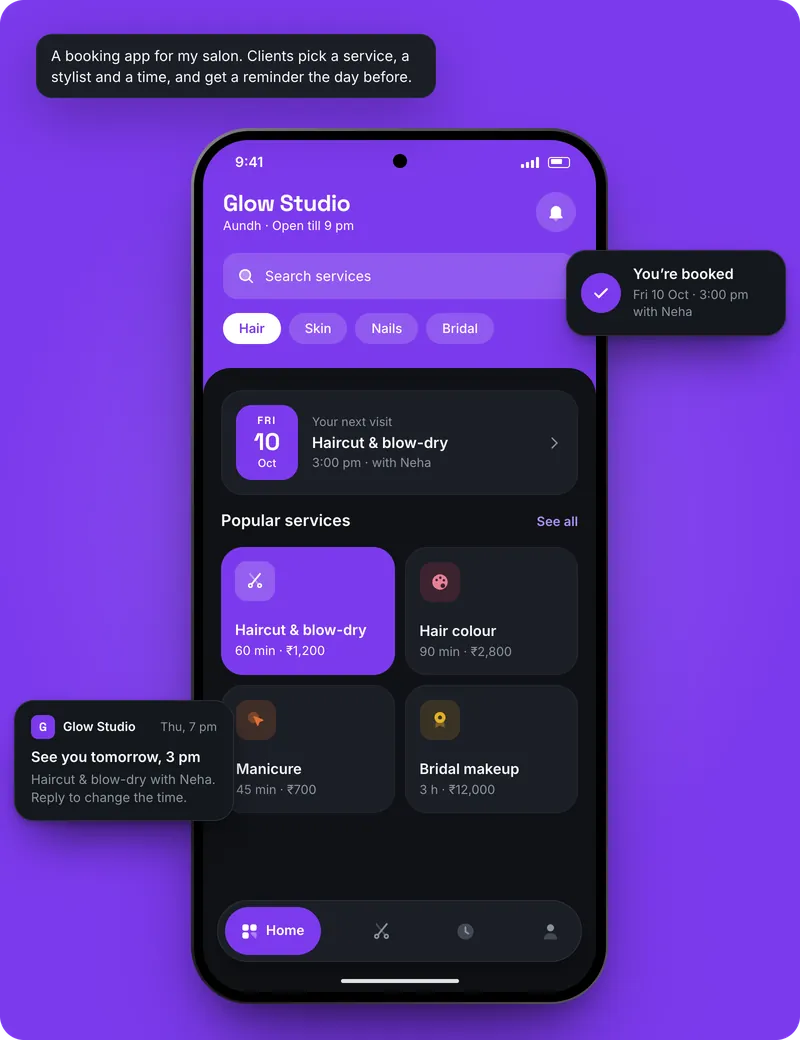
How to make it with AppCub, step by step
- Decide what the app does. List the screens you need, for example: Today, Clients, Rate list, Package cards, Home visits.
- Describe it to AppCub. Paste the request below, changed to your own business and details.
- Check the plan. AppCub shows the screens and features it will build. Change them in the chat until they are right; seeing the plan is free.
- Try it on your phone. The app runs live next to the chat. Scan the QR code to install it, and ask for changes.
- Share it. Share it as a web link, an APK file, or publish it on Google Play from your own developer account.
Copy this request, change the details to match your beauty parlour, and paste it into AppCub:
Make an app for my ladies-only parlour, Roop Beauty Parlour in Patna. Screens: today, clients, rate list, package cards, home visits and bills. Three beauticians. Today's list mixes walk-ins and appointments. Save notes on each client, such as skin type and which wax suits her. Package cards like 4 threading and 1 facial count down after each visit. Home visits have an address, a map link and ₹150 extra. Bills by cash or UPI with a PDF to send on WhatsApp. Add a list of clients who haven't come in 30 days. Pink and maroon colours, Hindi labels.
AppCub has a ready-made app you can start from: see it here.
Tips for a beauty parlour app
- Start from AppCub's ready-made salon app and ask it to change the services to your parlour's rate list.
- Enter the time each service takes, so a 90-minute bridal trial doesn't overlap a facial.
- Keep client notes about skin and allergies short, and use them only inside the parlour.
- Try a full Saturday with test clients before you move your register into the app.
- Ask for the WhatsApp confirmation message in Hindi if most of your clients prefer it.
What it costs
- Describing your app and seeing AppCub’s plan for it is free.
- A new app usually takes 60 to 110 credits. Start with the 2-day trial for ₹99 (150 credits, enough for one app and a few changes) or the one-time App Pack for ₹499. Starter is ₹1,599 a month for 700 credits.
- Google Play needs a paid plan (it includes the Play Store bundle and your app’s signing key) and your own Google Play developer account, a one-time US$25 fee to Google.
- Work that fails or is rolled back costs no credits.
Good to know
- The app doesn't connect to card machines or send SMS by itself. Confirmations and reminders go out on WhatsApp when someone at the counter taps the button.
- AppCub builds Android apps. You can also share the app as a web link that opens on any phone; for the iPhone App Store, AppCub’s team can do it for you.
Questions
Is there a ready-made app I can use for my parlour?
Yes. AppCub's ready-made salon app starts free; change the services, staff and colours to your parlour's in the chat.
Can the app keep track of monthly package cards?
Yes. Ask for packages with a number of visits, and each visit is ticked off so you and the client see how many are left.
Can I save which wax or facial suits each client?
Yes. Each client has notes, such as skin type or a reaction to a product, that show up when you open her record.
Can I manage home visit bookings in the app?
Yes. A home visit keeps the address, a Google Maps button and the extra charge, and the beautician can open the map from the booking.
Does the app work when the internet is down?
Yes, if only the counter phone uses it, because the data stays on that phone. With an online database, it needs internet to share the data.
Can clients see the app without installing anything?
You can share the app as a web link that opens in any phone browser. For your counter, installing it as an Android app is usually easier.
Read next
- How to make a website for a beauty parlour
- See the ready-made app on AppCub
- App for a barber shop
- App for a bridal studio
- App for a makeup artist
- App for a mehndi artist
- App for a nail studio
- App for a salon
- All guides: beauty and wellness
- All app guides by business
Make your beauty parlour app
Seeing the plan is free. Building starts with a 2-day trial for ₹99.