 AppCub
How to make an app for a kirana shop
At a kirana counter, three things slip through: the udhaar of regular families written in a diary, items that run out before the supplier comes, and the small home delivery orders that arrive on WhatsApp all day. An app on the shop's phone keeps the khata, the stock and the day's delivery list together.
Updated 2026-11-09
Who uses the app
Usually the owner and one family member or helper at the counter. If one phone runs it, data can stay on that phone and the app works without internet. If two people use it on their own phones, or families should order from a price list, connect your own Supabase database.
The screens a kirana shop app needs
- Khata: Each regular family with what they owe, entries by date, and a WhatsApp button with a polite reminder
- Items: Items with price, unit (kg, packet, piece) and count in the shop, with search
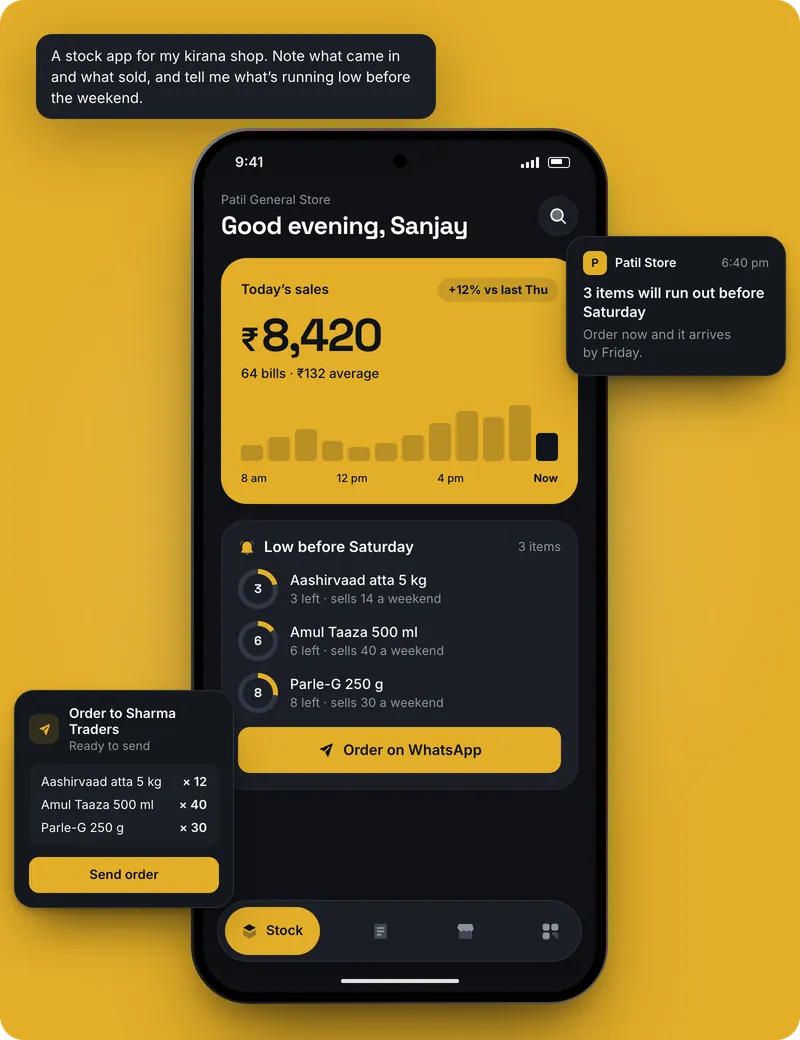
- Running low: Items below the minimum you set, and a reorder list to send to your supplier on WhatsApp
- Delivery orders: Today's small orders by building and flat, marked packed and delivered
- Today: Cash, UPI and udhaar sales for the day, and the month's total
- Price list: For customers, if you want it: your items with prices and a button that sends the order to your WhatsApp
Features worth asking for
- Udhaar entries with date and items, and a balance per family
- A reminder on the shop phone on the 1st of every month to settle accounts
- Minimum stock for each item and a reorder list for the supplier
- Scan an item's barcode with the phone camera to find it quickly (in the installed app)
- Your UPI QR shown on screen so customers can pay at the counter
- Delivery orders grouped by building so the delivery boy makes one round
- Hindi labels and big buttons for quick use at the counter
Where the data lives
If only the shop phone uses the app, the data stays on that phone and works offline; back it up now and then. If your son or helper uses it on another phone, or customers order from a price list, connect your own Supabase database from the chat.
How to make it with AppCub, step by step
- Decide what the app does. List the screens you need, for example: Khata, Items, Running low, Delivery orders, Today.
- Describe it to AppCub. Paste the request below, changed to your own business and details.
- Check the plan. AppCub shows the screens and features it will build. Change them in the chat until they are right; seeing the plan is free.
- Try it on your phone. The app runs live next to the chat. Scan the QR code to install it, and ask for changes.
- Share it. Share it as a web link, an APK file, or publish it on Google Play from your own developer account.
Copy this request, change the details to match your kirana shop, and paste it into AppCub:
Make an app for my kirana shop, Gupta Kirana Store in Shastri Nagar, Kanpur. Screens: khata, items, running low, delivery orders, today and settings. Khata: each family with entries by date and a balance, and a WhatsApp reminder button. Items with price, unit and count; I set a minimum and see what is running low, then send a reorder list to my supplier on WhatsApp. Delivery orders by block and flat, marked packed and delivered. Today's sales by cash, UPI and udhaar. Show my UPI QR on screen. Hindi labels, big buttons. Orange and white colours.
AppCub also has a page about a kirana shop app: see it here.
Tips for a kirana shop app
- Start from AppCub's ready-made udhaar khata app if udhaar is your main worry, then add stock and delivery orders in the chat.
- Enter only the 50 items that run out most often at first. Add the rest as you restock them.
- Set a minimum for fast items like milk, sugar and oil before the weekend, so the running-low list is useful on Friday.
- Write the WhatsApp reminder for udhaar in the words you would say yourself, in Hindi or English.
- Use the same phone at the counter every day so the khata doesn't split between two phones.
What it costs
- Describing your app and seeing AppCub’s plan for it is free.
- A new app usually takes 60 to 110 credits. Start with the 2-day trial for ₹99 (150 credits, enough for one app and a few changes) or the one-time App Pack for ₹499. Starter is ₹1,599 a month for 700 credits.
- Google Play needs a paid plan (it includes the Play Store bundle and your app’s signing key) and your own Google Play developer account, a one-time US$25 fee to Google.
- Work that fails or is rolled back costs no credits.
Good to know
- AppCub doesn't connect to billing machines, weighing scales or receipt printers, and nothing goes to customers by itself. Udhaar reminders and orders go out when you tap the WhatsApp button and send.
- AppCub builds Android apps. You can also share the app as a web link that opens on any phone; for the iPhone App Store, AppCub’s team can do it for you.
Questions
Is there a ready-made app for a kirana shop?
AppCub's ready-made udhaar khata app starts free in about 5 minutes. You can add stock, a running-low list and delivery orders to it in the chat.
Can I keep udhaar and stock in the same app?
Yes. Ask for a khata screen and an items screen in one app. A sale can be marked cash, UPI or udhaar.
Can the app scan barcodes on packets?
Yes. In the installed Android app, the phone camera can scan a packet's barcode to find the item. It doesn't work in the web preview, and it doesn't connect to a separate scanner.
Will the app work when the internet is down?
An app that keeps its data on the shop phone works offline. An app connected to an online database needs internet to save and sync.
Can my regular families order from the app?
Yes. Ask for a price list where they pick items and send the order to your WhatsApp. Connect a Supabase database so they see your current prices.
How is this different from the grocery store app idea?
A grocery app is mostly a customer catalogue. A kirana app is mostly for your counter: udhaar, stock and small deliveries, with a customer price list only if you want one.
Read next
- How to make a website for a kirana shop
- See the kirana shop app page
- App for a fertiliser and seeds shop
- App for a book store
- App for a boutique
- App for a clothing store
- App for a cosmetics shop
- App for a distributor
- All guides: shops and retail
- All app guides by business
Make your kirana shop app
Seeing the plan is free. Building starts with a 2-day trial for ₹99.