 AppCub
How to make an app for a housing society
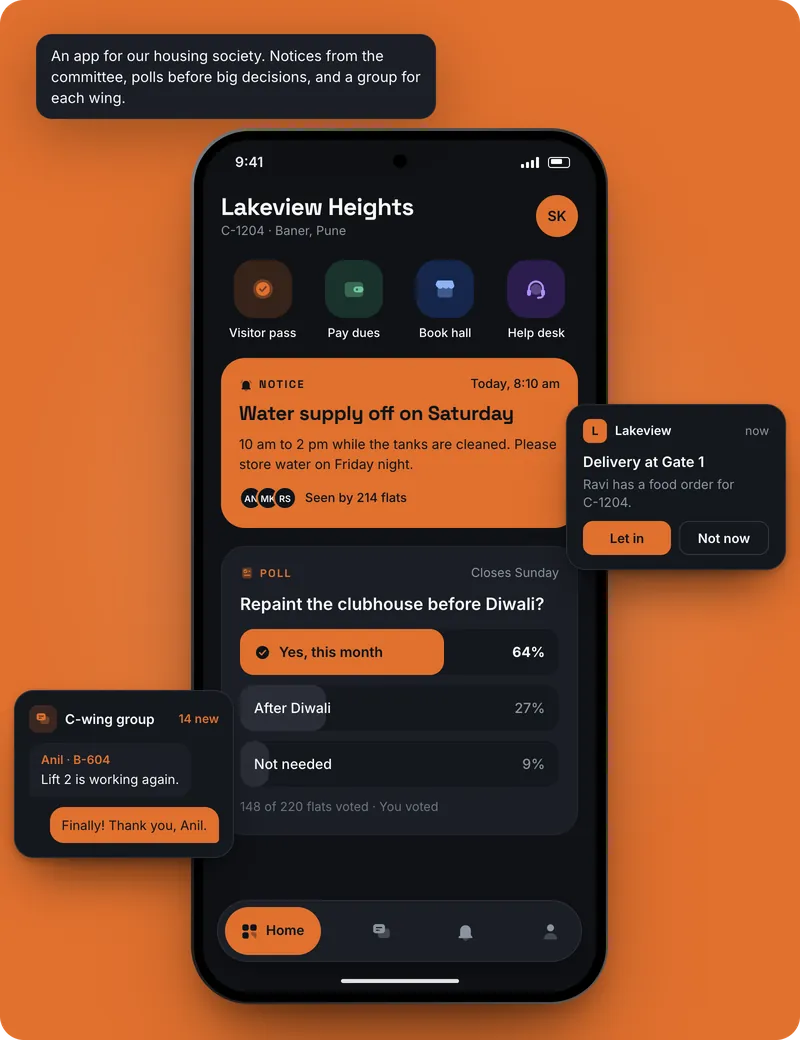
A housing society's office tracks hundreds of flats: who owns each one, who lives there, how much maintenance is due by square foot, which lift complaint is open and who has booked the party hall on Saturday. An app gives the committee, the office and residents the same picture instead of spreadsheets and a busy WhatsApp group.
Updated 2026-11-09
Who uses the app
The facility office and the committee, and usually the residents too. Because many people on their own phones need the same flats, dues and notices, connect your own Supabase database with sign-in, so each resident sees only their own flat's bills.
The screens a housing society app needs
- Flats: Tower, flat number, area in square feet, owner, tenant if any, and parking slots
- Maintenance: Each flat's bill for the quarter by area, sinking fund and other charges, paid or due
- Complaints: Lift, plumbing, seepage and security complaints with flat, photo, status and who fixed them
- Notices: Water cut, lift servicing, AGM dates and festival plans, newest first
- Polls: Questions for members, such as painting quotes, with one vote per flat and the result
- Amenity bookings: Clubhouse, party hall and guest room by date, with charges for each booking
- My flat: For residents: their bills, receipts, complaints and bookings
Features worth asking for
- Maintenance worked out by area, with the sinking fund and parking charges added
- A maintenance receipt as a PDF for each flat
- One vote per flat in polls, with the count visible to the committee
- Complaints with photos and a status residents can check
- A party hall calendar that stops two flats booking the same evening
- A WhatsApp reminder button for flats with dues outstanding
- Paying maintenance through the society's own Razorpay account
Where the data lives
A society app is shared by the office, committee and residents, so connect your own Supabase database with sign-in from the start. To let residents pay maintenance in the app, connect the society's own Razorpay account; the money goes to the society.
How to make it with AppCub, step by step
- Decide what the app does. List the screens you need, for example: Flats, Maintenance, Complaints, Notices, Polls.
- Describe it to AppCub. Paste the request below, changed to your own business and details.
- Check the plan. AppCub shows the screens and features it will build. Change them in the chat until they are right; seeing the plan is free.
- Try it on your phone. The app runs live next to the chat. Scan the QR code to install it, and ask for changes.
- Share it. Share it as a web link, an APK file, or publish it on Google Play from your own developer account.
Copy this request, change the details to match your housing society, and paste it into AppCub:
Make an app for our apartment society, Sunrise Heights in Kharghar, with six towers and 420 flats. Screens: flats, maintenance, complaints, notices, polls, amenity bookings and my flat for residents. Maintenance is ₹3.50 per sq ft a quarter plus sinking fund and parking. Residents sign in and see only their flat's bills, receipts and complaints. Complaints have a category, photo and status. Polls allow one vote per flat. The party hall and guest room are booked by date with a charge. Office staff mark payments. Blue and grey.
AppCub also has a page about a housing society app: see it here.
Tips for a housing society app
- Start with flats and maintenance, because every other screen depends on the flat list being right.
- Import the flat list from the office's spreadsheet by pasting it in the chat, then check a few flats by hand.
- Decide who can see what: residents see their own flat, the treasurer sees all dues, guards see only what they need.
- Keep residents' phone numbers private; the app should not show one resident's details to another.
- AppCub's page on housing society apps (/housing-society-app/) has more ideas for notices, polls and dues.
What it costs
- Describing your app and seeing AppCub’s plan for it is free.
- A new app usually takes 60 to 110 credits. Start with the 2-day trial for ₹99 (150 credits, enough for one app and a few changes) or the one-time App Pack for ₹499. Starter is ₹1,599 a month for 700 credits.
- Google Play needs a paid plan (it includes the Play Store bundle and your app’s signing key) and your own Google Play developer account, a one-time US$25 fee to Google.
- Work that fails or is rolled back costs no credits.
Good to know
- AppCub doesn't connect to boom barriers, intercoms, CCTV or accounting software, and it doesn't send notices automatically. Notices appear in the app, and the office can share them on WhatsApp with one tap.
- AppCub builds Android apps. You can also share the app as a web link that opens on any phone; for the iPhone App Store, AppCub’s team can do it for you.
Questions
Can residents pay maintenance in the society app?
Yes, through the society's own Razorpay account once Razorpay and Supabase are connected. The money goes to the society's account, and the flat is marked paid.
Can the app work out maintenance by square foot?
Yes. Give each flat's area and your rate, plus fixed charges like the sinking fund and parking, and the quarter's bill is worked out for each flat.
Can we hold polls in the app?
Yes. Ask for polls with one vote per flat, so a family can't vote twice, and the committee sees the count.
Do residents get a notice on their phone when we post one?
They see it when they open the app. Alerts from the office's phone to residents' phones need a push service you set up yourself, so most societies also share notices on WhatsApp.
Can tenants use the society app?
Yes. Give tenants their own sign-in on the flat, and decide whether they see the maintenance bills or only notices and complaints.
How do residents install the society app?
Share it as a web link that opens in any phone browser, as an APK file, or through Google Play from the society's own developer account.
Read next
- How to make a website for a housing society
- See the housing society app page
- App for a builder
- App for a coworking space
- App for a guest house
- App for a homestay
- App for a hostel
- App for a hotel
- All guides: property and stay
- All app guides by business
Make your housing society app
Seeing the plan is free. Building starts with a 2-day trial for ₹99.